Developer experience
Item building and comparisons
Section titled “Item building and comparisons”Creating complex ItemStack instances is a long and unpleasant process. That’s why the GDK provides the GDKItems class in the fr.noradrenalin.gdk.utils (Java) package.
This utility provides already built items like “previous” and “next” arrows in inventories UI, as well as the dark background item for these inventory views.
It provides an ItemStack Builder class that you can use the same way you would with other ItemBuilders :
val item = GDKItems.Builder(Material.IRON_SWORD, 1, "${ChatColor.AQUA}Super sword") .addSafeEnchant(Enchantment.DURABILITY, 1) .setDurability((Material.IRON_SWORD.maxDurability - 3).toShort()) .addItemFlags(ItemFlag.HIDE_ATTRIBUTES) .buildUndroppableItem();Which would build this item :
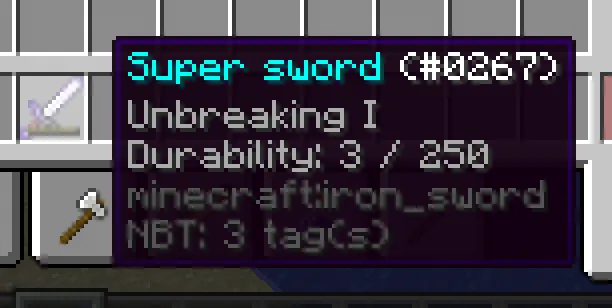
Droppable, undroppable, system items
Section titled “Droppable, undroppable, system items”The builder exposes three terminal build* methods that differ only in the GDK NBT ownership flag:
| Method | NBT flag | Use it for |
|---|---|---|
buildUndroppableItem() (alias build()) | yes | Role / scenario items the player must not be able to leave behind on death. The death-drop filter strips flagged stacks before respawn. |
buildSystemItem() | yes | Same as buildUndroppableItem. Reads better at call sites where the stack is a system / role artifact rather than gameplay loot. |
buildDroppableItem() (replaces the deprecated unflaggedBuild()) | no | Items the GDK gives to a player but is happy to see dropped on death (starter loot, scenario rewards). |
Pick the variant that documents intent at the call site. The deprecated unflaggedBuild() still delegates to buildDroppableItem() for backward compatibility, but new code should use the explicit name.
Justified lore in one line
Section titled “Justified lore in one line”The recurring “split a description, colour each line, append it as lore” pattern has a dedicated helper:
val item = GDKItems.Builder(Material.NETHER_STAR, 1, name()) .addJustifiedLore("Vous permet de configurer la partie : génération, scénarios, limitations, bordure...") .buildUndroppableItem();Overloads let you pick a custom width and prefix colour:
.addJustifiedLore(description(), 60).addJustifiedLore(description(), 60, ChatColor.AQUA)This replaces the old addLore(GDKText.Alignment.justify(text, 70).map { "${ChatColor.GRAY}$it" }) boilerplate.
It also provides a compare function to check if two ItemStack matches. This function returns a boolean and has multiple prototypes :
compare(lhs: ItemStack?, rhs: ItemStack?): Booleancompare(lhs: ItemStack?, rhs: ItemStack?, compareAmount: Boolean = false): Boolean
As you can see, by default, the compare function ignores the amount of items in the ItemStack. This behavior allows to count quantities of items matching a certain item “signature”
GDK Constants and conversions
Section titled “GDK Constants and conversions”In order to help with the DX (developer experience), the GDK contains predefined constants and conversion tools to avoid using brain power on these cases.
Time, Delays and duration
Section titled “Time, Delays and duration”In the fr.noradrenalin.gdk.utils package you’ll find multiple utilities including GDKConstants.kt and GDKConversions.kt.
GDKConstants.kt exposes the TaskDelay object which contains constants such as ONE_TICK_DELAY, ONE_SECOND_DELAY and so on. It also provides a after(Duration) function to compute the duration in game ticks.
Here is an example to better understand :
MyGameTask().runTaskLater(.., GDKConstants.TaskDelay.ONE_TICK_DELAY)MyGameTask().runTaskLater(.., GDKConstants.TaskDelay.ONE_SECOND_DELAY)MyGameTask().runTaskLater(.., GDKConstants.TaskDelay.after(Duration.ofMinutes(2)))It also exposes the TaskPeriod object which contains constants to define task cycles with better semantic as well, see by yourself :
MyGameTask().runTaskTimer(.., .., GDKConstants.TaskPeriod.EVERY_TICK)MyGameTask().runTaskTimer(.., .., GDKConstants.TaskPeriod.EVERY_SECOND)MyGameTask().runTaskTimer(.., .., GDKConstants.TaskPeriod.every(Duration.ofMinutes(5)))Inventory primitives: GDKMenu and GDKPaginatedMenu
Section titled “Inventory primitives: GDKMenu and GDKPaginatedMenu”For modules building configuration panels and paginated views, the GDK exposes two typealiases over the FastInv inventory primitives shaded into the framework:
import fr.noradrenalin.gdk.views.GDKMenuimport fr.noradrenalin.gdk.views.GDKPaginatedMenuGDKMenu is FastInv and GDKPaginatedMenu is PaginatedFastInv. Use the aliases in your panel classes so the FastInv dependency stays an implementation detail of the GDK; if a future release swaps the underlying inventory library, downstream modules only have to follow the alias.
Namespaced identifiers: GDKNamespacedKey
Section titled “Namespaced identifiers: GDKNamespacedKey”Spigot 1.8.8 lacks the modern org.bukkit.NamespacedKey, so the GDK ships its own value type:
import fr.noradrenalin.gdk.utils.GDKNamespacedKey
val hunterId = GDKNamespacedKey("bh", "hunter")val parsed   = GDKNamespacedKey.parse("bh:hunter")     // round-trips through asString()hunterId.asString()                                     // "bh:hunter"
Both UHCGameRole.id() and UHCGameTeam.id() return a GDKNamespacedKey. The class is a Kotlin data class, so map / set membership and equality are structural.
Text alignment
Section titled “Text alignment”As of now (1.8.8), Bukkit/Spigot/PaperMC do not provide anything to make developers life easier regarding text alignment in places like ItemStack#lore attribute, or anything that has text, really.
The GDK provides a GDKText utility in the fr.noradrenalin.gdk.utils package, which provides a way to create text that follows an alignment. As of now, every Minecraft text is left aligned by default. Center aligned text feels off (yes, this GDK’s development is opinionated). Then which one is missing ? “Alignment : Justify” :
// By default, it provides a list of String since Minecraft's items lore is stored as such.val justifiedTextLines: List<String> =    GDKText.Alignment        .justify("This is an example of text justification.", 16) // 16 is the max Width allowed/*Which would output the following list :[    "This    is    an",    "example  of text",    "justification.  ",]*/
// However, if you want to get a basic String output, you can simply do thisval justifiedText: String =    GDKText.Alignment        .justify("This is an example of text justification.", 16)        .joinToString("\n")
/*Which would output the following string :
"This    is    an\nexample  of text\njustification.  "*/